 Mike's
 You're Probably Using the Same Password Everywhere
Here's why that's dangerous, and how a password manager can protect your family and your business.
By Mike | July 2026 | 5 minute read
Most People Have a Password Problem
Think about how many places you sign in these days: email, banking, shopping, streaming, social media, insurance, utilities, your phone company, your doctor's office, school portals, work accounts. Most people have way more online accounts than they realize.
Here's the thing though: the problem isn't that people are careless. The problem is that people are human. Nobody's built to remember dozens or hundreds of long, random, unique passwords. So we do what feels practical: we reuse the same password in more than one place.
And that shortcut can turn into a serious problem. If one password gets exposed, several accounts can be at risk at the same time.
One Simple Way to Picture It
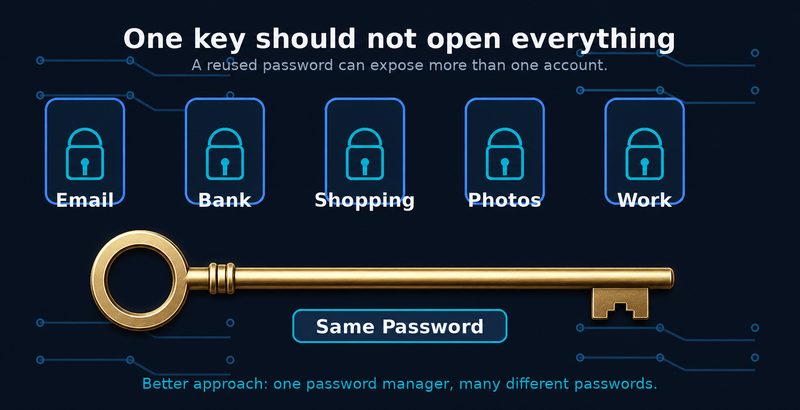
Using the same password everywhere is like using one key for your house, your car, your office, your bank, and your email. It feels convenient, right up until that one key gets copied. A password manager lets you keep a different key for everything, without having to memorize a single one of them.
How Criminals Really Get Into Accounts
Most account compromises aren't movie-style hacks. In most cases, criminals get usernames and passwords from old data breaches, then automatically test those combinations against popular services.
Here's a simple example. You use the same password for a shopping website, your email, and a social media account. The shopping site gets breached, and that password gets tried against your email and social media. If it works, the attacker never had to touch your computer. They just signed in with a password that was already floating around out there.
I've seen how this plays out up close, and it's never dramatic. Nobody “hacks in.” A password that leaked from some site years ago simply still works somewhere important, and by the time anyone notices, the damage is already spreading.
That's why email deserves special attention. Your email account is usually the recovery point for everything else. Protecting it with a unique password and multi-factor authentication is one of the most important security moves a person or a small business can make.
The Solution: Use a Dedicated Password Manager
My recommendation is a dedicated password manager, rather than letting your web browser handle all of your passwords.
This isn't about scaring anybody. Browser password managers are better than reusing the same password everywhere. But for long-term security, organization, sharing, and flexibility, a tool built specifically for managing credentials is the better home for them.
A password manager creates a different password for every account, stores them all in an encrypted vault, and fills them in when you need them. You remember one strong master password. The manager handles the rest.
Our Recommendation: Bitwarden
Bitwarden is the password manager I use myself and the one I've set up for my own family. It's open source, it gets audited regularly by third-party security firms, it works across all the major platforms, and the free version is genuinely good for individuals and families.
Why I like Bitwarden:
- It creates strong, unique passwords for every account.
- It stores everything in an encrypted vault.
- It works on Windows, macOS, Linux, Android, iPhone, and all the major browsers.
- It supports secure sharing for families.
- It supports passkeys and modern sign-in options.
- The free version is genuinely useful, and the paid options are affordable when you need them.
At the end of the day, the best password manager is the one people will actually use. For my money, Bitwarden hits the right mix of security, usability, transparency, and value.
What About Browser Password Managers?
Plenty of people already save passwords in Chrome, Edge, Safari, or Firefox. If that's you, it's still better than reusing one password everywhere. But my professional recommendation is to move your important passwords into a dedicated manager.
The reason's simple: a dedicated password manager keeps your passwords separate from the browser, works more consistently across devices, keeps things better organized, and gives families and small businesses more control.
Turn On Multi-Factor Authentication
A password manager matters, but it shouldn't be your only layer of protection. Multi-factor authentication, usually called MFA, adds a second step when you sign in: an authenticator app, a security key, Face ID, a fingerprint, that kind of thing.
If someone gets your password, MFA can still stop them at the door. That's why I recommend turning it on for your most important accounts first.
Three Accounts to Protect First
Your email is the master key to your online life. Protect it first, with a unique password and MFA.
Banking and Credit Cards
Financial accounts should never share a password with shopping, social media, or entertainment sites.
Apple, Google, or Microsoft Account
These accounts usually hold your photos, files, backups, device settings, and password recovery options.
Five Things You Can Do This Week
Don't try to fix every password in one night. Start with the accounts that matter most, then chip away at the rest over time.
- Install Bitwarden or another reputable password manager.
- Change your email password to a strong, unique one.
- Turn on MFA for your email and financial accounts.
- Replace reused passwords on shopping, social media, and healthcare accounts.
- Close old accounts you don't use anymore when you can.
Frequently Asked Questions
Do I really need a different password for every website?
Yes. If one website gets breached, a unique password keeps that breach from spreading to your other accounts.
Is a password manager safe?
A reputable password manager is far safer than reusing passwords. It's built to store credentials securely and make strong passwords practical.
Can this work for a whole family?
Yes. A password manager makes it easier for a family to use strong passwords and securely share the accounts that need sharing.
Should I still use multi-factor authentication?
Yes. MFA adds another layer of protection and it's one of the simplest ways to shut down account takeovers.
Final Thoughts
Cybersecurity doesn't have to be overwhelming. For most people, the biggest single improvement comes down to one habit: stop reusing passwords. A password manager, unique passwords, and MFA can seriously cut your risk without making everyday life complicated.
That's really the whole goal at Mike's IT Consulting: explain technology in plain language and help families and businesses make practical security improvements that actually stick.
Need help securing your office accounts?
Mike's IT Consulting can roll out password managers, multi-factor authentication, and practical security protections for your business.
Request a Free Assessment